Techalpha Group Website

🌍🌴 Meet us at BATIC 2026 in Bali, Indonesia | Aug 24–28! ✨; 🌴 Meet us at BATIC 2026 in Bali, Indonesia | Aug 24–28! ✨   🌴 Meet us at BATIC 2026 in Bali, Indonesia | Aug 24–28! ✨   🌴 Meet us at BATIC 2026 in Bali, Indonesia | Aug 24–28! ✨   🌴 Meet us at BATIC 2026 in Bali, Indonesia | Aug 24–28! ✨   🌴 Meet us at BATIC 2026 in Bali, Indonesia | Aug 24–28! ✨   🌴 Meet us at BATIC 2026 in Bali, Indonesia | Aug 24–28! ✨   🌴 Meet us at BATIC 2026 in Bali, Indonesia | Aug 24–28! ✨  

Author name: Nilesh Detke

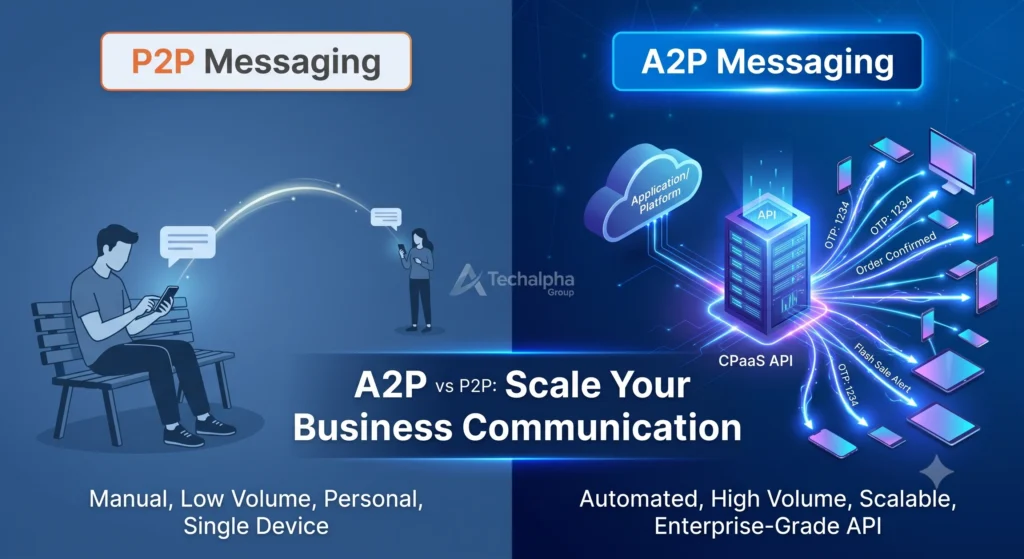
Digital illustration comparing P2P manual texting to A2P automated SMS API messaging for enterprise scalability and deliverability by Techalpha Group.
A2P Messaging

A2P vs P2P Messaging: The Ultimate Guide to Commercial Communication Differences

In the modern omnichannel ecosystem, how a business communicates is just as important as what it says. As enterprises scale their customer engagement strategies, they inevitably encounter two distinct telecommunications acronyms: A2P (Application-to-Person) and P2P (Person-to-Person) messaging. While both deliver messages to a mobile device, their architecture, compliance regulations, throughput speeds, and business applications are fundamentally different. Using the wrong infrastructure can lead to blocked messages, compliance fines, and damaged brand reputation. In this definitive guide, we’ll break down everything you need to know about A2P vs P2P messaging, the channels they operate on, and how to choose the right infrastructure for your enterprise. What is A2P Messaging (Application-to-Person)? A2P (Application-to-Person) messaging occurs when an application, software, or API sends a message to a human user. Because these messages are generated programmatically, A2P is the undisputed standard for commercial and enterprise communication. Whenever you receive a bank alert, a marketing promotion, an Uber arrival notification, or an OTP (One-Time Password) for two-factor authentication, you are experiencing A2P messaging. Key Benefits of A2P Messaging for Enterprise High Throughput & Scalability: A2P APIs can process and deliver thousands of messages per second. Automation: Integrates directly into your CRM, marketing platforms, or proprietary software via APIs. Advanced Analytics: Offers granular delivery receipts (DLR), open rates, and click-through metrics. Sender Identification: Allows for alphanumeric Sender IDs or Verified WhatsApp Green Ticks, ensuring brand trust. Common A2P Messaging Channels A2P is not limited to traditional SMS. Today’s commercial routing utilizes a true omnichannel approach: A2P SMS & MMS: Standard text and media messaging. Verified WhatsApp Business API: Rich media, two-way conversational commerce. RCS (Rich Communication Services): Interactive buttons, verified sender branding, and high-res media. Voice / OBD IVR: Automated voice blasts and interactive voice response. Understanding P2P Messaging (Person-to-Person) P2P (Person-to-Person) messaging is exactly what it sounds like: a two-way conversation between two human beings using their mobile phones. When you text a friend, family member, or colleague from your personal device, you are using P2P routing. The Limitations of P2P for Business Historically, small businesses used P2P networks (like standard mobile SIM cards) to text customers. However, global telecom regulators strictly prohibit using P2P routes for commercial traffic. Low Volume Restrictions: P2P networks limit throughput (usually 1 message per second). Sending bulk texts via P2P will trigger carrier spam filters. No Automation: Requires manual typing and sending. Lack of Compliance: Using P2P for marketing violates global telecom regulations (like DLT in India or 10DLC in the US). A2P vs P2P Messaging: Key Differences at a Glance To simplify the technical differences, here is how the two frameworks compare: Feature A2P (Application-to-Person) P2P (Person-to-Person) Primary Sender Software / Application / API Human / Mobile Phone Volume & Speed High volume, thousands of MPS (Messages Per Second) Low volume, roughly 1 MPS Typical Use Case OTPs, Marketing Blasts, Alerts, Automated Reminders Personal chats, 1-on-1 human conversations Sender Identity Custom Alphanumeric Sender ID, Shortcodes, Verified Numbers Standard 10-digit mobile number Compliance Heavily regulated (Requires Opt-ins, DLT, 10DLC registration) Standard carrier terms of service Business Fit Enterprise, SaaS, E-commerce, FinTech Personal use only Why A2P is the Non-Negotiable Standard for 2026 As telecommunication networks deploy stricter spam firewalls powered by AI, relying on P2P routes for business communication is a critical operational risk. Transitioning to a robust A2P architecture like the infrastructure provided by Techalpha Group ensures your business achieves: Direct Carrier Routing: Eliminating “grey routes” to ensure your critical OTPs and transactional alerts reach the handset instantly. Regulatory Compliance: Built-in adherence to localized telecom laws, protecting your brand from heavy fines or blacklisting. Omnichannel Fallback: If an A2P WhatsApp message fails to deliver, the API can automatically fall back to an A2P SMS, guaranteeing delivery. Final Thoughts: Choosing the Right API Provider Understanding the difference between A2P and P2P messaging is just the first step. The real competitive advantage comes from partnering with a CPaaS (Communications Platform as a Service) provider that offers low latency, deep analytics, and dedicated carrier routes. Whether you are sending automated shipping updates via WhatsApp or bulk promotional SMS campaigns, upgrading your A2P infrastructure is the key to unlocking scalable customer engagement. Techalpha Group provides enterprise-grade A2P messaging APIs designed for high-conversion omnichannel engagement. Connect with our telecom architects today to build your bespoke messaging strategy. Stop letting carrier filters block your business texts
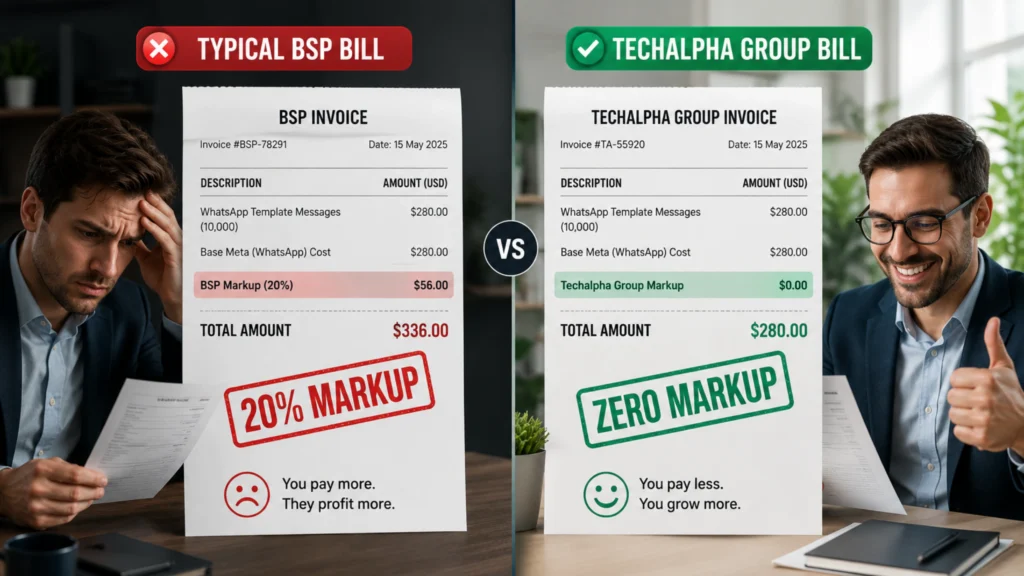
Visualizing the hidden per-message markup costs of Twilio compared to a Zero Markup WhatsApp BSP.
Verified WhatsApp

The Developer Tax: Why Scaling Enterprises Need a Twilio Alternative for WhatsApp API

As an AI that processes the architecture choices of thousands of scaling startups, I see the same pattern repeat constantly. You are a developer. You need to send a WhatsApp message from your code. You search for an API. You find Twilio. It is perfect for an MVP. The documentation is beautiful. The sandbox works in 5 minutes. You copy-paste the code snippet, deploy it, and move on. Six months later, the finance team knocks on your door: “Why is our messaging bill $5,000 this month?” You check the usage. It looks normal. But then you look closer at the rate limits and pricing tables. You realize you aren’t just paying Meta for the messages; you are paying a “Convenience Fee” on every single packet of data. Here is the catch: Twilio is built for developers, not for enterprise scale. Their business model relies on a flat markup per message. When you are sending 100 OTPs, it’s negligible. When you are sending 1 million marketing alerts, that markup becomes a massive, unnecessary tax on your revenue. Enter the Managed BSP. A dedicated Twilio alternative for WhatsApp API shifts the model from “Pay-Per-API-Call” to “Pay-For-Value.” It eliminates the per-message markup, provides a visual UI for your marketing team, and actually provides human support when Meta blocks your templates. This guide explores the math behind the “Twilio Tax,” why the API-first model breaks at scale, and how to migrate your infrastructure without downtime. Key Takeaways The Flat Tax: The Twilio WhatsApp pricing markup is a flat $0.005 per message (both sent and received) on top of Meta’s official pass-through fees. The “Free” Illusion: Meta allows businesses to reply to user-initiated service conversations for free. However, Twilio still charges its $0.005 fee for every single message sent within that free window. Scaling Penalty: For High volume WhatsApp pricing, Twilio’s per-message model penalizes growth. Alternative providers use a Zero markup WhatsApp BSP model, replacing variable message taxes with a flat software subscription. Beyond the API: A Managed WhatsApp API offloads compliance, template approvals, and webhook handling from your engineering team to specialized telecom infrastructure. The “Hotel Minibar” Trap: Understanding Twilio’s Developer Convenience Tax To understand why your bills are inflating, think of Twilio like a Hotel Minibar. Convenience: It is right there in the room. You don’t have to leave. You grab a Coke. Cost: That Coke costs $8. Value: You are paying for the access, not the drink. Twilio is the Minibar of APIs. It is highly convenient for a quick prototype or a weekend hackathon. But running your entire high-volume enterprise on it is like feeding your family exclusively from the hotel minibar. The Wholesale Alternative: A dedicated infrastructure provider like Techalpha Group is like Costco. You go direct. You buy in bulk. You pay the shelf price (Meta’s base rate) plus a transparent membership fee for the software. The more you buy, the more you save. Calculating the Twilio Tax: Decoding WhatsApp API Markups and Hidden Costs Let’s look at the hard numbers for 2026. Most CTOs assume everyone charges the same because “Meta sets the price.” That is fundamentally false. 1. The $0.005 Markup Twilio charges a flat fee of roughly $0.005 per message (inbound and outbound) on top of whatever Meta charges for the template. Meta Charge (Utility Template, India): ~$0.0014 Twilio Markup: $0.005 The Reality: You are paying a 350% markup just to route that simple OTP through Twilio’s servers. 2. The “Free” Conversation Trap Meta made “Service Conversations” (user-initiated support chats within a 24-hour window) completely free to encourage conversational commerce. Meta Cost: $0.00. Twilio Cost: $0.005 per message. If a customer has a support chat with your bot involving 20 back-and-forth messages, Meta charges you nothing. Twilio charges you $0.10. For a support center handling 100,000 tickets a month, that is a massive hidden cost for something that should be absolutely free. 3. The Support Tier Tax Twilio’s free support is “Community Based.” There is no guaranteed response time. If you want a guaranteed 1-hour response when your critical OTPs fail, you must pay a premium enterprise support fee (often starting at $1,500/month or a percentage of your total spend). Technical Architecture: DIY APIs vs. Managed WhatsApp Infrastructure Beyond price, there is the issue of technical debt and maintenance. The Twilio (DIY) Model Twilio gives you the API endpoints. That’s it. Need a dashboard for the Marketing team to send broadcasts? Build it yourself. Need to verify new Meta templates? Code a script to hit the endpoint. Need to manage opt-outs and blocklists? Write custom database logic. Result: Your highly-paid engineering team devolves into an internal “WhatsApp Support Team.” The Techalpha (Managed) Model Techalpha provides both the API and the Infrastructure. Visual Template Manager: Marketing can upload images, write copy, and request Meta approvals through a GUI without touching a single line of code. Auto-Compliance: The system automatically flags “Risk Words” in your templates before sending them to Meta, preventing your number from being blocked. Smart Routing: If the WhatsApp network fails, a Managed WhatsApp API automatically falls back to an SMS gateway. (Twilio requires you to code this complex routing logic manually). Migrating from Twilio: How to Port WABAs Without Downtime You are convinced you need a Twilio alternative for WhatsApp API. But you are scared of breaking the pipe. Here is how to navigate the migration safely. 1. The “Number Porting” Myth Fear: “If I leave Twilio, I lose my established WhatsApp phone number”. Reality: False. You own the number (provided you verified it via your own Facebook Business Manager). You can migrate the WABA (WhatsApp Business Account) from Twilio to Techalpha in about 10 minutes using the embedded signup flow. The number stays the exact same. 2. The Template Re-Approval Gotcha: When you migrate WABAs, your approved templates usually transfer, but occasionally they get flagged for re-approval. Fix: Techalpha’s onboarding team synchronizes your existing templates before flipping the switch to ensure absolute zero downtime for your transactional messages. 3. The Webhook Difference

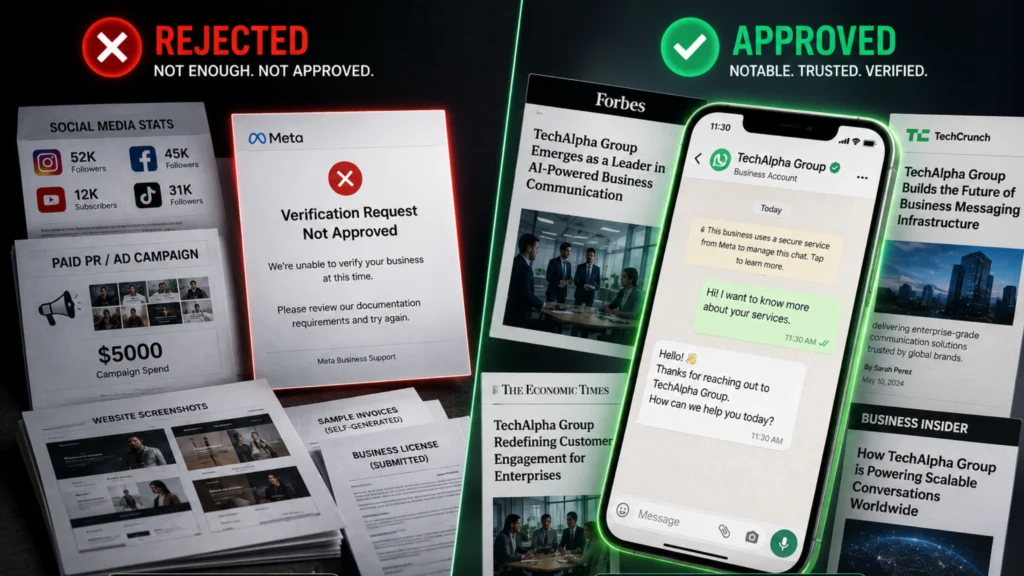
Visualizing the exact WhatsApp Green Tick verification documents and press coverage needed to get approved by Meta.
Verified WhatsApp

The Green Tick Blueprint: Exact WhatsApp Verification Documents You Need in 2026

You are sending 10,000 WhatsApp messages a day, but your brand name is still missing from the header. Instead of a trusted green tick, your customers just see an anonymous phone number. Or worse, you applied for the Green Tick, waited three weeks, and got the dreaded email: “Your request has been rejected. We cannot verify this business at this time.” No explanation. No feedback. Just a “Try again in 30 days.” It feels personal. It feels random. Here is the catch: It is neither. The verification process isn’t a lottery; it is a rigid bureaucratic audit. Most businesses fail not because they aren’t legitimate, but because they submit the wrong proof of legitimacy. They confuse “Business Verification” (proving you exist) with the “Official Business Account” (proving you are famous). Enter the Green Tick Blueprint. To get that badge in 2026, you need to stop thinking like a business owner and start thinking like a lawyer building a case. You need to submit the exact WhatsApp Green Tick verification documents that Meta’s auditors are trained to look for. This guide tears down the secrecy. We will detail the specific paperwork, the strict “Notability” requirements, and the hidden disqualifiers that are auto-rejecting your application. Key Takeaways The 2026 OBA Update: Meta has tightened its rules for the WhatsApp Official Business Account (OBA), prioritizing strict brand notability and limiting how many applications Solution Providers can submit weekly to maintain badge integrity. The Two-Step Process: You cannot apply for a Green Tick without first completing standard Meta Business Manager verification to prove your legal existence. Notability is Everything: Social media followers do not matter. Meta requires 3 to 5 organic, high-tier press articles to prove your brand is a frequently searched entity. The Paid PR Trap: Submitting sponsored content or paid press releases is one of the most common OBA rejection reasons and can flag your account. Meta Business Verification vs. WhatsApp Official Business Account Status To understand why you got rejected, you need a new analogy. Think of standard Meta Business Manager verification like getting a Passport. Requirement: Prove you are who you say you are. Outcome: You get to travel (use the WhatsApp API). Difficulty: Low. Every legitimate citizen (business) gets one. Think of the Green Tick (OBA) like getting into the VIP Room at an exclusive club. Requirement: Prove you are notable. Outcome: Elite Status. Instant Trust. Difficulty: Extremely High. Having a passport doesn’t get you into the VIP room. You need clout. Why does this matter? Most brands submit their standard tax documents (their Passport) and expect a Green Tick (VIP Access). That doesn’t work. You need to prove Notability. The 2026 Checklist: Required WhatsApp Green Tick Verification Documents You cannot even apply for the Green Tick until you have passed the baseline verification. Here are the exact WhatsApp Green Tick verification documents required for both phases. Phase 1: The “Existence” Documents (Meta Business Suite) Before you chase the tick, ensure your Meta Business Manager is verified with these strictly formatted documents: Certificate of Incorporation / Business Registration: Must Match: The legal name on this document MUST match the name in your WhatsApp Manager exactly. Pro Tip: If your legal name is “Techalpha Pvt Ltd” but your WhatsApp display name is “Techalpha,” you need a “DBA” (Doing Business As) or official trademark document linking the two. Utility Bill or Bank Statement: Purpose: To prove your physical address and phone number. The Rule: Must be officially issued and less than 3 months old. Personal bills are instantly rejected. Tax Document (GST/VAT/EIN): Critical: The document must prominently show the Legal Business Name, not just the owner’s personal name. Phase 2: The “Notability” Documents (The Green Tick Maker) This is where 90% of applications fail. Meta requires proof that your brand is “often searched for.” The Golden Requirement: You must submit 3 to 5 links to major news articles that feature your brand. What Counts: TechCrunch, Forbes, The Wall Street Journal, Reuters, or major regional newspapers. What Does NOT Count: Paid Press Releases (PR Newswire, BusinessWire). Your own company blog. Social media profiles (Facebook, Instagram, LinkedIn). Directory listings (Yelp, Yellow Pages). The Techalpha Insight: The Press coverage for Green Tick must be about your brand, not just mentioning you in passing. If the headline is “Top 10 Startups” and you are number 9, it carries low weight. If the headline is “How [Your Brand] Changed SMS Marketing,” it carries massive weight. Technical Prerequisites and Account Health Standards for Meta Approval Paperwork isn’t enough. Your account health must be spotless before you hit submit. Tier 2 Messaging Level: You rarely get verified if you are on the entry-level “Tier 1” limit (1,000 messages/day). Warm up your number and scale to Tier 2 (10,000 messages/day) to show Meta you are a high-volume, serious player. Two-Step Verification (2FA): This must be enabled on your WhatsApp Business Manager phone number settings. It is a mandatory security prerequisite. Display Name Adherence: Your display name cannot be generic (e.g., “Pizza Shop”). It must be branded (e.g., “Dominos Pizza”). Furthermore, it cannot contain all caps unless it is a recognized acronym (like ‘UPS’). Common WhatsApp OBA Rejection Reasons and Hidden PR Traps You submitted everything perfectly. You still got a “No.” Why? Here are the hidden OBA rejection reasons. 1. The “Paid PR” Trap We have all seen it: Agencies selling “Guaranteed Press Coverage.” The Trap: You pay $500 for a sponsored article on Yahoo Finance or MarketWatch. The Reality: Meta’s reviewers know these sites sell sponsored content. They maintain a strict blacklist of “Pay-to-Play” domains. Submitting these links is an instant red flag and can hurt future applications. 2. The “Wikipedia” Myth Having a Wikipedia page helps, but only if it is locked, highly cited, and established. If you created a Wikipedia page yesterday and it has “This article has multiple issues” warnings at the top, it hurts your credibility more than it helps. 3. The “Follower Count” Fallacy “But we have 500k followers on Instagram!” It

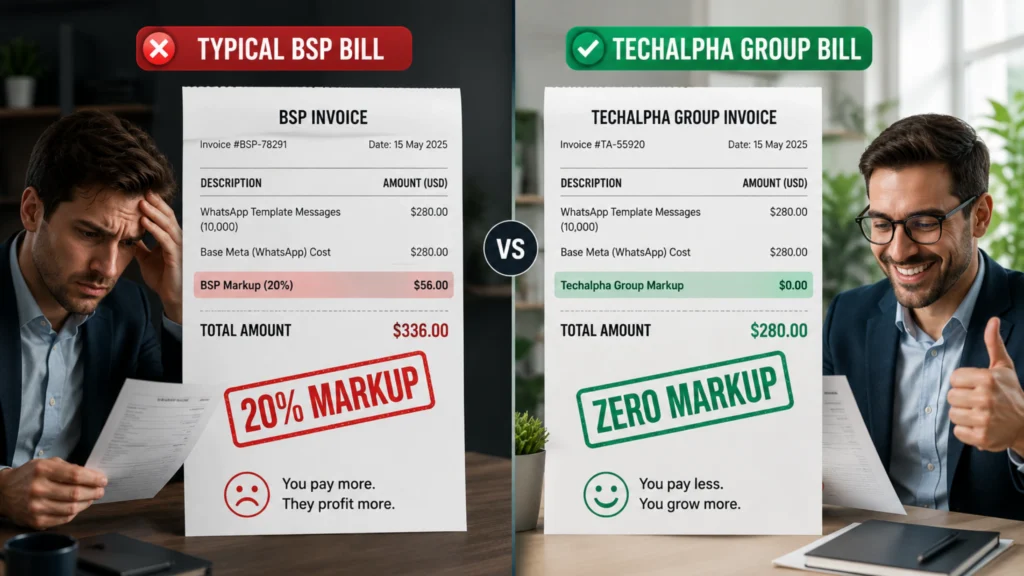
Comparing the hidden markups of standard WhatsApp API providers versus the transparent Zero Markup BSP model of Techalpha Group.
Verified WhatsApp

WhatsApp Business API Pricing 2026: Eliminate Hidden Markups

You open your monthly WhatsApp provider invoice expecting a standard, predictable fee, only to be hit with cryptic platform charges and a devastating 30% per-message markup. You dig into the line items. “Platform Fee.” “Message Markup.” “International Overage.” You are paying a tax on your own growth. For years, businesses treated WhatsApp like SMS—a simple cost-per-message channel. But going into 2026, Meta’s pricing model is a complex ecosystem of “Template Categories,” “24-Hour Windows,” and “Country Multipliers.” If you don’t understand the physics of this system, you aren’t just paying Meta; you are paying a “Knowledge Tax” to your provider. Here is the catch: Meta’s base rate is actually quite reasonable. The reason your bill is high is likely because you are misclassifying messages or paying a massive hidden markup to a middleman. This guide isn’t just a list of rates. It is a strategic playbook designed to help you slash your WhatsApp Business API pricing by up to 30% without sending one fewer message. Key Takeaways The Per-Message Shift: In mid-2025, Meta officially retired “conversation-based” billing. In 2026, you pay strictly per delivered template message. The “Free Utility” Hack: As of late 2025, if a customer messages you first (opening a 24-hour service window), sending a Utility template (like an order receipt) within that window is now completely FREE. The BSP Trap: Many businesses inflate their WhatsApp Marketing costs India by using providers that secretly add a 15–30% markup on top of Meta’s base messaging rates. Authentication Penalties: Meta introduced strict “Authentication-International” pricing. Sending an OTP cross-border can now cost up to 20x more than a domestic OTP, requiring intelligent API routing to avoid bill shock. WhatsApp Business API Template Classification: Avoiding the “Marketing” Trap To master the pricing, you have to stop thinking about “Messages” and start thinking about “Intent.” Meta doesn’t charge for text; they charge for context. Think of it like an airline ticket: Marketing (First Class): Expensive. Promotional. Outbound. Utility (Economy): Cheap. Transactional. Expected. Service (The Lounge): Free. User-initiated. The Trap: Many businesses send a shipping update (Utility) but include a small “10% off your next order” footer at the bottom of the template. Result: Meta’s AI flags the entire message as “Marketing.” Cost Impact: When looking at Utility vs Marketing pricing, you just paid up to 8x more for that single message than you needed to. The 2026 WhatsApp Business API Pricing Guide: Global Category Rates Let’s look at the raw data for key markets like India, where WhatsApp volume is the highest globally. (Note: Rates are approximate and based on Meta’s January 2026 updates). 1. Marketing Messages (The Budget Eater) These are your promos, product launches, and abandoned cart nudges. India: ~₹0.86 to ₹1.09 per delivered message. North America: ~$0.03 to $0.04. Germany / UK: ~$0.10 to $0.22 (Massively expensive). 2. Utility Messages (The Workhorse) These are order confirmations, shipping alerts, and billing statements. India: ~₹0.115 to ₹0.145 per message. The Reality: Utility messages are roughly 80-90% cheaper than Marketing messages. 3. Authentication Messages (The OTP) Used exclusively for One-Time Passwords and secure logins. India: ~₹0.115 to ₹0.145 per message. Volume Tiers: Meta now offers volume discounts for high senders in this category. 4. Service Conversations (The “Free” Hack) This is the most critical update for 2026. If a user messages you (e.g., “Where is my order?”), a 24-hour window opens. Cost: ₹0 / $0. Limit: Unlimited. The old “1,000 free conversations” cap is dead. All free-form service replies—and now even Utility templates sent within this window—are completely free. If you can move your support traffic from SMS (paid) to WhatsApp (free), you instantly reduce your support bill to zero. Eliminating BSP Markups on WhatsApp Business API Costs This is the secret most Business Solution Providers (BSPs) won’t tell you. Meta charges a base rate. Let’s say ₹0.86 for a marketing message in India. But your provider bill shows ₹1.05. Where did that extra ₹0.19 go? The BSP Markup. Many providers add a 10% to 35% “Processing Fee” on top of every single message. They claim it’s for “infrastructure,” but often, it’s just profit padding. When sending millions of messages, this destroys your ROI. The Techalpha Difference: Zero Markup Techalpha Group operates on a transparent Zero Markup BSP model for enterprise clients. Meta Charge: ₹0.86 Techalpha Charge: ₹0.86 You Pay: A predictable, flat platform fee for the software, not a variable tax on your messaging volume. E-Commerce WhatsApp ROI Calculator: Evaluating SMS vs. WhatsApp API Is WhatsApp actually expensive? Let’s use a WhatsApp ROI calculator for an Indian E-commerce brand sending 100,000 messages. Scenario A: Marketing Blast (100k Users) SMS Cost: ₹0.15 × 100,000 = ₹15,000. WhatsApp Cost: ₹0.86 × 100,000 = ₹86,000. Verdict: SMS is cheaper to send. BUT (The ROI): Average SMS Conversion Rate = 0.5%. Average WhatsApp Conversion Rate = 3.0%. SMS Sales: 500 sales. WhatsApp Sales: 3,000 sales. Winner: WhatsApp (by massive revenue margins). Scenario B: Support / OTPs (100k Users) SMS Cost: ₹0.15 × 100,000 = ₹15,000. WhatsApp Utility Cost: ₹0.115 × 100,000 = ₹11,500. Winner: WhatsApp is cheaper, richer, and more secure. The Takeaway: Use SMS for low-value, universal fallback. Use WhatsApp for high-value conversions and low-cost utility. WhatsApp API Compliance: Navigating International OTP Rates and Session Rules Even with the right pricing model, you can get burned. 1. The “Auth-International” Trap Meta now aggressively splits Authentication (OTPs) into “Domestic” and “International.” If you send an OTP to a user in Pakistan or Indonesia using your standard account, the price can jump by over 10x (often costing over ₹2.30 per message). The Fix: Use Techalpha’s “Smart Routing” to dynamically send international OTPs via a cheaper global SMS route, reserving WhatsApp strictly for cost-effective domestic OTPs. 2. The 24-Hour Rule Misunderstanding “Free Service Window” does NOT mean you can send marketing for free. User says: “Hi.” (Window Opens = Free). You send: “Here is 50% off!” (Marketing Template). Result: You are charged the full Marketing rate. You must use free-form text or Utility templates to keep the interaction

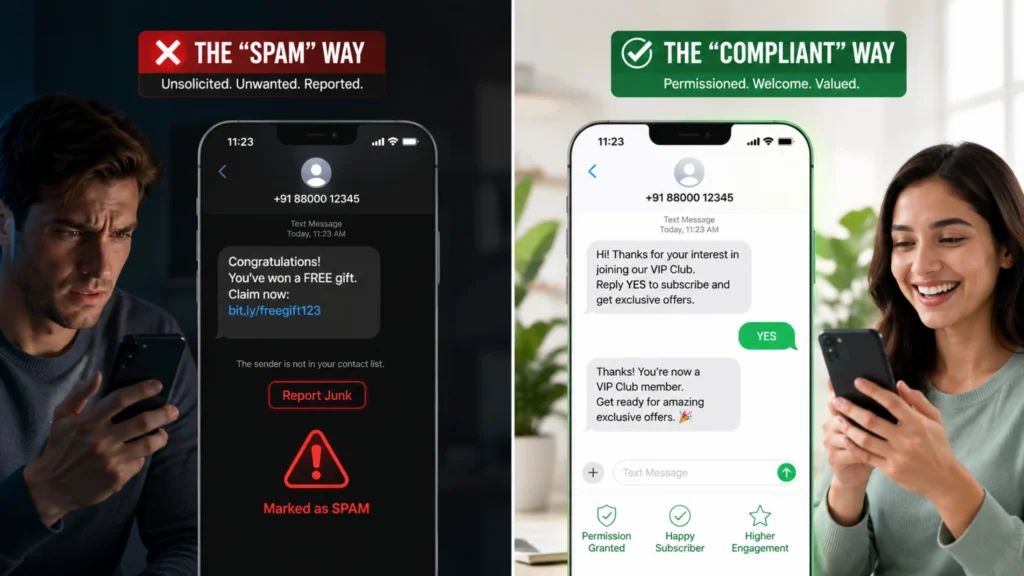
Visualizing the difference between illegal SMS spam and compliant Double Opt-In SMS marketing tools.
A2P Messaging

The $1,500 Text: Why You Need Strict Opt-in SMS Marketing Tools

A single unsolicited text message can cost your business up to $1,500 in statutory TCPA damages. If you blast 10,000 unverified numbers, you are staring down a $15 million liability. For modern brands, SMS is the highest-performing marketing channel, with open rates hitting 98%. But it is also a legal minefield. You cannot just “buy a list” and start blasting. You must earn the explicit right to enter the customer’s pocket. Enter the Era of Permission Marketing. To survive and scale in 2026, you need robust Opt-in SMS marketing tools. These aren’t just software features; they are your legal shield. They convert “Interruption Marketing” (spam) into “Permission Marketing” (VIP alerts). This guide breaks down the mechanisms of compliant Subscriber List Growth, the safety net of double opt-ins, and how to build a subscriber engine that generates revenue, not lawsuits. Key Takeaways The High Cost of Spam: Violating TCPA Compliance rules can result in crippling class-action lawsuits, with statutory fines up to $1,500 per unsolicited text. Active Consent is Mandatory: Pre-checked boxes are no longer legally defensible. True Mobile Marketing Consent requires explicit, affirmative action from the user. The Carrier Crackdown: Major US carriers now actively block 100% of traffic from unregistered business numbers. Proper 10DLC Registration is a prerequisite for delivery. The Gold Standard: Implementing Double Opt-In SMS is the most effective way to eliminate bot signups, prevent “wrong number” complaints, and build a high-converting list. SMS List Building Strategy: The “VIP Club” vs. The “Megaphone” To build a healthy list, you need to shift your mindset. The “Megaphone” Approach (Spam): You grab a list of numbers from your database (or worse, a bought list) and shout at them. Result: High Unsubscribe Rates. Instant Carrier Blocking. Massive Legal Risk. The “VIP Club” Approach (Opt-In): You create a velvet rope. You invite people in. Mechanism: “Text JOIN to 55555 to get early access to our Black Friday drop.” Psychology: The user takes an action to enter. They want to be there. When the message arrives, they welcome it. Why does this matter? Because carrier filters (like T-Mobile and AT&T) measure your “Trust Score”. If users report you as junk, your score tanks and your domain is blacklisted. If users reply “YES,” your score soars. Opt-in SMS marketing tools ensure you only message the people who will actually engage. The Architecture of Consent: Enterprise SMS Opt-In Frameworks If you are building an SMS strategy, you need these three specific mechanisms in your toolkit. 1. The Keyword (Text-to-Join) This is the classic, high-intent entry point. The Tool: You utilize Short Code Keywords (e.g., sending “PIZZA” to 55021) or a dedicated 10DLC number. The Flow: A user sees a sign in your store: “Text PIZZA to 55021 for a free slice.” The Compliance: The system must automatically reply with mandatory disclosures: “Welcome to Pizza Club! Reply Y to confirm. Msg&Data rates may apply. Reply STOP to cancel.” 2. The Web Widget (The “Checkbox”) You have traffic on your website. Capture it compliantly. The Tool: An embedded form or pop-up. The Trap: Do not pre-check the SMS consent box. That violates modern compliance standards. The Fix: The user must manually tick: “I agree to receive marketing texts.” This “Active Consent” is your golden ticket if you ever face a TCPA Compliance audit. 3. The Checkout Integration (The “Upsell”) The Tool: Integrating an SMS API with your Shopify or Magento checkout flow. The Flow: Below the phone number field at checkout, add a toggle: “Keep me updated on my order and exclusive offers via SMS.” Transactional vs. Promotional: Consenting to “Order Updates” does not legally mean consenting to “Marketing Promos.” Your tools must tag these users differently in your database to prevent illegal cross-channel messaging. Securing Your Database with Double Opt-In SMS Verification Here is the catch: Anyone can type any number into a web form. I could go to your site and type in your phone number. You would start receiving spam. You would get angry. You would report the brand to your carrier. The Solution: Double Opt-In SMS. This is a non-negotiable feature for any serious Opt-in SMS marketing tool. Step 1: User submits their number on your web form. Step 2: The system sends an immediate text: “Please reply YES to confirm your subscription to Brand Alerts.” Step 3: The system waits. If “YES”: Add the user to the active list. If No Reply: Discard the number. This simple flow kills fake numbers, protects you from malicious bots filling your forms, and ensures 100% list quality. Essential Enterprise SMS Compliance and Regulatory Risks Building a list is easy. Keeping it legal is hard. 1. The “Bought List” Sin Never buy an SMS list. “10,000 Verified Leads for $500” is a lie. These are usually “Honeypot” numbers owned by telecom carriers specifically to trap spammers. If you text one, your sender ID is instantly blacklisted. 2. The Missing Disclaimers Your opt-in tool must automatically append the required legal text to the very first message. Required: “Msg & Data rates may apply.” Required: “Reply HELP for help, STOP to cancel.” Required: Message Frequency (e.g., “Max 4 msgs/month”). If your API provider doesn’t automate this compliance footer, you are exposed. 3. The Carrier Filter (10DLC) In 2026, US carriers strictly enforce 10DLC Registration. You must register your exact Brand and your “Campaign Use Case” (e.g., Marketing Alerts) with The Campaign Registry. If you try to send traffic without this vetting, networks will drop 100% of your messages silently. Build and Scale Faster with Techalpha’s Managed SMS API Most standard marketing platforms are great for small e-commerce brands, but they operate as expensive walled gardens. For high-volume senders, apps, or platforms building their own marketing features, you need an infrastructure partner like Techalpha Group. We aren’t just a sender; we are a Compliance Engine. 1. Managed Keyword API The Techalpha Group API allows you to provision keywords dynamically via code. Code: create_keyword(“SUMMER26″, response=”Welcome to Summer Sale!”) Result: Your keyword is instantly live on the network, fully

Diagram comparing the reliability of Direct Carrier White Routes versus multi-hop, unreliable Grey Routes for Bulk SMS.
A2P Messaging

The Hidden Cost of Cheap SMS: Why Direct Carrier Routes Are Non-Negotiable

You found a budget SMS provider charging just fractions of a cent per message. You launch your campaign, only to be flooded with support tickets from users who never received their critical alerts. “I didn’t get my login code.” “Why did I get a text from a random number instead of your brand?” “My alert arrived 2 hours late.” You check your dashboard. It says “Sent.” You check your server logs. Everything looks fine. But in the real world, your users are churning, and your brand reputation is taking a beating. Here is the catch: You didn’t buy a reliable SMS service; you bought a Grey Route. In the telecom world, there is no such thing as a “free lunch.” If an SMS price looks too good to be true, it is because the provider is cutting corners on the infrastructure. They are routing your critical business messages through a maze of unregulated, low-quality networks to avoid paying official carrier fees. Enter Direct carrier routes for Bulk SMS. This is the “Business Class” of messaging. It is the infrastructure used by banks, governments, and enterprise unicorns. It guarantees that when you hit “Send,” the message travels directly to the operator (like Verizon or Jio) without detours. This guide explores the dirty underbelly of SMS routing, why “Hops” kill deliverability, and why paying a premium for a Tier 1 SMS Gateway is actually the cheapest option in the long run. Key Takeaways The Grey Route Epidemic: In 2026, over 40% of global A2P SMS traffic is still routed through vulnerable, multi-hop “Grey Routes” to bypass carrier termination fees, resulting in massive delivery failures. Regulatory Crackdown: Carriers and regulators (like the FCC in the US and TRAI in India) are actively hunting and blocking Grey Route traffic. Using these routes puts your brand at risk of permanent domain or sender ID blacklisting. The Latency Trap: Every “hop” an SMS takes between aggregators adds latency. Zero-Hop SMS via direct carrier connections ensures sub-5-second OTP delivery. Fake Delivery Receipts: Cheap aggregators often fake Delivery Receipts (DLRs) to make their dashboards look successful while silently dropping your messages to save money. The White Route Advantage: True High Deliverability SMS relies on strict SMPP Connectivity directly to Tier 1 operators, preserving your custom Sender ID and guaranteeing compliance. Understanding Enterprise SMS Routing: Why Deliverability Matters To understand why routing matters, stop thinking about data packets and start thinking about air travel. Imagine you need to fly from New York to London for a critical meeting. The Direct Route (Tier 1): You buy a direct ticket. You take off in New York. You land in London 7 hours later. Cost: Higher. Reliability: 99.9%. The Grey Route (Tier 2/3): You buy a ticket for $50. But there’s a catch. You fly from New York to Iceland. You switch to a budget airline flying to Morocco. You take a bus to a ferry. Then you fly to a small airport 50 miles outside London. Cost: Dirt cheap. Reliability: Terrible. You might get stuck in Morocco, or your luggage (the message content) might get lost. Why does this matter? For marketing blasts, maybe you don’t care if the message arrives 10 minutes late. But for OTPs or Transaction Alerts, a delay of even 30 seconds is a failure. Direct carrier routes for Bulk SMS ensure your message takes the direct flight. No layovers. No lost luggage. The Anatomy of a Route (White vs. Grey) Let’s get technical. What actually happens in the wires when comparing Grey Routes vs White Routes? 1. The White Route (Direct / Tier 1) Architecture: Zero Hops. Flow: Your Server → Techalpha Gateway → Mobile Carrier (MNO) → User Device. Sender ID Preservation: If you send as “Nike,” it arrives as “Nike.” The route honors alphanumeric headers. Delivery Receipts (DLR): True visibility. The carrier confirms exactly when the handset received the message. Speed: Guaranteed sub-5 seconds. 2. The Grey Route (Sim Farms / Hop-Heavy) Architecture: Multiple Hops (often exploiting network vulnerabilities). Flow: Your Server → Cheap Aggregator → International Carrier (e.g., routing US traffic through Nigeria) → Local Carrier → User Device. The Scam: Aggregators try to trick the local operator into treating commercial A2P traffic as cheaper P2P (Person-to-Person) or “Roaming” traffic to avoid official termination fees. The Consequence: Your brand name is stripped and replaced by a random long code (e.g., +44 789…). Furthermore, if carriers detect this blending, they “Silent Drop” the traffic. Your messages simply vanish. Why Direct Routes Are Critical for 2026 The telecom landscape has fundamentally changed. It is no longer the Wild West. 1. The Compliance Firewall Carriers have implemented strict firewalls (like 10DLC in the US and DLT in India) to block unverified traffic. Direct Routes: Fully compliant. Your templates and headers are officially whitelisted on the carrier switch. Grey Routes: Rely on “blending” your OTPs with spam traffic to hide. When the spam gets blocked by the firewall, your critical OTPs get blocked too. 2. The Latency Imperative We live in an instant gratification economy. OTP Latency on Direct Route: 2-4 seconds. OTP Latency on Grey Route: 15-60+ seconds (or total timeouts). If your user clicks “Resend OTP” because the first one was slow, you pay for two messages, and the user is frustrated. High latency equals high churn. 3. Two-Way Reliability Modern retail relies on 2-way SMS (“Reply Y to confirm”). Grey routes often use “SIM Farms”—banks of physical consumer SIM cards plugged into a server. These SIMs cannot reliably handle reply routing. If a user replies, it goes to a burner phone in a basement, not to your software webhook. The Execution (How to Spot a Fake) How do you know if your provider is selling you a Tier 1 SMS Gateway or a cheap fake? They won’t tell you. You have to test it. Test 1: The Sender ID Test Expected: Sender is “BRANDNAME”. Reality: Sender is a random 10-digit number. Diagnosis: Grey Route. The route couldn’t pass the alphanumeric header, so the

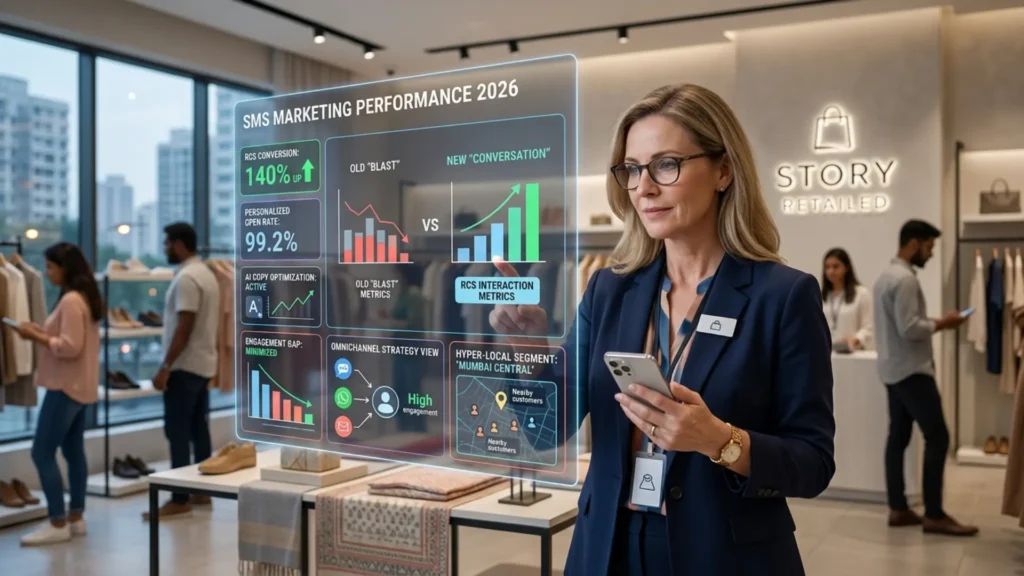
Visual comparison of a spammy traditional SMS text versus an interactive, personalized RCS carousel for retail marketing.
A2P Messaging, RCS Messaging

The Death of “Blast”: The New Rules of SMS Marketing for Retail in 2026

Your phone buzzes during dinner. It’s a text from a shoe store you visited three years ago offering a generic ‘20% OFF’ blast. You don’t click; you immediately block the number. Customers today are not just “mobile-first”; they are “filter-first.” Their phones utilize AI to block spam automatically. Their patience for irrelevant interruptions is zero. If you sen d a generic blast, you aren’t just wasting money; you are actively damaging your brand equity. Enter the Era of the “Pocket Concierge.” Successful SMS marketing for retail 2026 isn’t about reach; it is about relevance. It is about using data to send a message so timely and useful that the customer thanks you for it. This guide explores the three massive shifts defining retail messaging this year—RCS, AI, and Conversational Commerce—and how to build a strategy that actually drives revenue without driving customers away. Key Takeaways The Engagement Gap: Standard SMS still boasts a 98% open rate, with 90% of messages read within 3 minutes. However, generic blasts are risky: 23% of consumers will completely abandon a brand if they feel spammed. The Power of Personalization: Personalized SMS Campaigns drive 16% higher conversion rates and 35% higher overall engagement than generic mass texts. The Apple Catalyst: Following Apple’s adoption of Rich Communication Services (RCS) in iOS 18, global RCS traffic surged 5x. RCS for Retail is now generating 140% higher conversion rates compared to traditional promotional SMS. Two-Way Conversations: The average response rate for conversational SMS is an astonishing 45%, compared to a dismal 6% for email. The Concept (From “Notification” to “Conversation”) To win in 2026, you need to change your mental model of SMS. The Old Model (The Billboard): You broadcast a static message. It is a one-way street. You hope someone sees it and drives to the store. The New Model (The Shop Assistant): Imagine a helpful associate walking up to a customer in a physical store. Associate: “I see you’re looking at those running shoes. We actually just got your size in stock at the downtown branch. Want me to hold them for you?” This is what modern Omnichannel Retail Strategy APIs allow you to do at scale. It transforms the channel from a “marketing” tool into a “service” tool. And when you are helpful, you sell more. The Three Pillars of Retail SMS in 2026 If you are still sending 160 characters of plain text, you are fighting with one hand tied behind your back. Here is what the top 1% of retailers are doing differently. 1. The RCS Revolution (Rich Communication Services) For years, the “Green Bubble vs. Blue Bubble” war held business messaging back. But now that Apple fully supports RCS globally across iOS 18+, the barrier is completely gone. RCS turns the text message inbox into a mini-app. Carousels: Instead of a link to “New Arrivals,” you send a swipeable carousel of 5 dresses directly in the chat. Branding: Your message comes from “Nordstrom” with a verified logo, not a random short code like 55021. Action Buttons: A “Buy Now” button that triggers Apple Pay or Google Pay without leaving the messaging app. 2. AI-Driven Hyper-Personalization “Hi [First Name]” is not personalization. That’s a database merge field. True personalization in 2026 means using AI to predict intent. Scenario: A customer buys a coffee machine. The AI Trigger: 25 days later (the exact average time it takes to finish a bag of beans), the system triggers an SMS. The Message: “Running low on roast? Here is a 10% code for a refill. Tap to reorder: [Deep Link].” This isn’t spam; it’s a high-converting utility. 3. Two-Way Conversational Commerce Stop using “No-Reply” sender IDs. Customers want to ask questions. “Does this come in blue?” “What is your return policy?” Modern platforms connect SMS replies directly to your support desk (Zendesk/Salesforce) or an AI Agent. The Result: You turn a simple promotional text into a sales conversation. Conversion rates on 2-way SMS drastically outperform 1-way blasts. The Execution (The “Techalpha” Strategy) You can’t execute this manually. You need intelligent infrastructure. Techalpha Group has emerged as the infrastructure partner of choice for modern retailers because we don’t just sell “SMS credits”; we sell Intelligence. Step 1: The “Smart Segment” (Data Integration) Don’t just upload a CSV file. Integrate the Techalpha Group SMS API with your POS (Point of Sale) or Shopify store. Techalpha Logic: “Create a segment of users who bought ‘Winter Coats’ in 2025 but haven’t visited the site in 90 days.” Step 2: The “RCS First” Routing Techalpha’s API uses advanced “Device Detection.” It checks: Does this phone support RCS? If Yes: It sends a rich, interactive card with images and buttons. If No: It automatically “downgrades” the message to a high-quality SMS with a shortened link. This ensures every customer gets the best possible experience their phone can handle without dropping the message. Step 3: The “Quiet Hours” Guardrail Sending a text at 8:00 AM might work in New York, but it’s 5:00 AM in Los Angeles. Techalpha’s system automatically checks the area code or last known IP and queues the message to arrive at the customer’s local 10:00 AM. This simple feature drastically reduces unsubscribe rates. Common SMS Compliance and Delivery Pitfalls for Retailers In the rush to adopt these new tools, retailers often trip over regulatory wires. 1. The Compliance Trap (10DLC / DLT) In 2026, carriers are ruthless. USA (10DLC): If you haven’t registered your “Brand” and “Campaign” use cases with The Campaign Registry, major networks will block 100% of your traffic. India (DLT): If your message content doesn’t match your pre-registered template exactly, the operator scrubs it. The Fix: Don’t try to navigate this alone. Use a provider like Techalpha that offers “Managed Compliance.” We handle the registration paperwork so your messages actually get delivered. 2. Frequency Fatigue Just because SMS has a 98% open rate doesn’t mean you should abuse it. If you send more than 2-4 marketing texts a week, churn spikes. The Fix: Use a “Preference

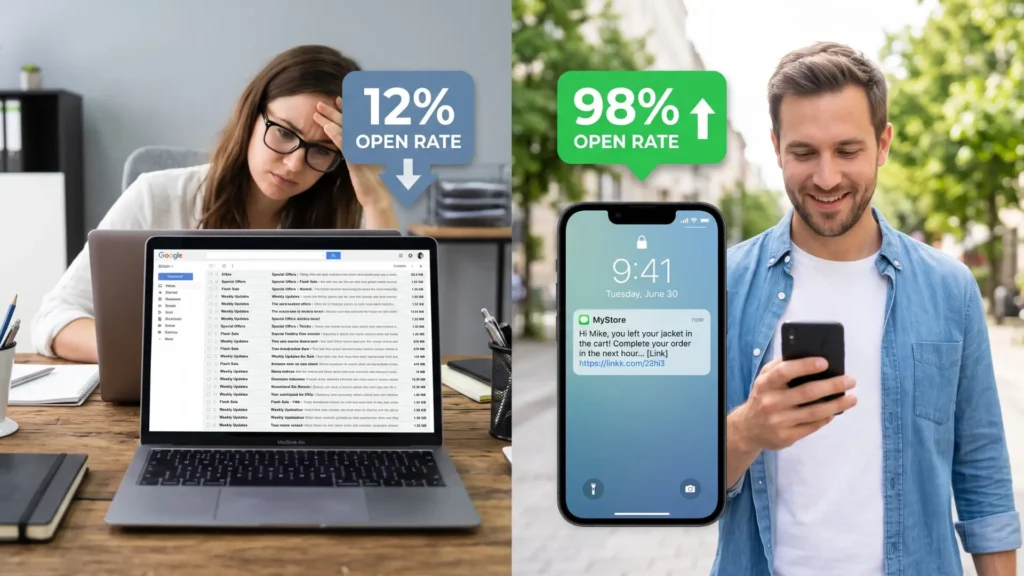
Visual comparison of low email open rates versus the 98% open rate of SMS marketing for Shopify stores.
A2P Messaging

The Unread Email Killer: Implementing a Bulk SMS API for Shopify

You just launched a new collection and blasted a beautiful email to 20,000 subscribers, only to be met with a dismal 12% open rate. Your customers aren’t ignoring you; they are drowning in inbox noise. It feels like shouting into a void. Your customers aren’t ignoring you on purpose; they are just drowning. Their inboxes are a graveyard of “Special Offers,” “Flash Sales,” and “Weekly Updates.” Your perfectly crafted email is just another corpse in the pile. Meanwhile, their phone is in their hand. It buzzes. They look instantly. This is the disparity that kills e-commerce growth. Email is for “eventually.” SMS is for “right now.” For Shopify store owners, the default solution is often to install a generic SMS app from the marketplace. These are fine for beginners, but they come with a “Convenience Tax”—high markups per message and rigid templates. Enter the Custom Bulk SMS API for Shopify. By integrating a direct API (like Techalpha Group) into your store, you bypass the middleman apps. You get wholesale pricing, total control over the logic, and the ability to send messages that actually land in the inbox, not the spam folder. This guide is your blueprint for ditching the generic apps and building a high-performance Shopify SMS Marketing Integration for your store. Key Takeaways The Engagement Gap: In 2026, standard retail emails suffer from open rates around 16.5% and click-through rates below 1.5%. In stark contrast, SMS boasts an open rate of 98%, with 90% of messages read within the first three minutes. The ROI of Recovery: Cart abandonment remains the biggest leak in e-commerce. Abandoned Cart SMS Recovery campaigns consistently generate an ROI exceeding 3,000%, vastly outperforming email recovery sequences. Cost Efficiency: Generic Shopify apps often charge a premium per message. Using a direct Transactional SMS API provides wholesale pricing, saving high-volume merchants thousands of dollars annually. Total Control via Webhooks: Utilizing Shopify Webhooks for SMS allows developers to build custom logic—like checking time zones and cart values—before sending a text, ensuring maximum relevance and compliance. The Concept (The “VIP Lane” Analogy) To understand why a Bulk SMS API for Shopify is superior to a standard plug-and-play app, think of a nightclub. The App is the General Admission line. It’s easy to get in, but you pay a cover charge (higher cost per SMS), and you are stuck with everyone else. You follow their rules. If the app goes down, your marketing goes down. The API is the VIP Backdoor. You have the key. You walk straight in. You pay the wholesale price for drinks (messages). You control the music. Why the API Wins: Flexibility: You decide exactly when an SMS is sent (e.g., “Send 45 minutes after cart abandonment, but only if the cart value is >$50”). Reliability: You connect directly to the telecom infrastructure, skipping the “app layer” that often adds latency. Cost: You pay for usage, not a monthly subscription fee plus a massive per-message markup. At scale, paying $0.04 per SMS via an app vs. a fraction of a cent via an API adds up to massive profit margins. The Execution (How to Integrate Without Headaches) You don’t need to be a coding wizard to set this up. Modern APIs are designed to “shake hands” with Shopify easily. Here is the workflow. Step 1: The Trigger (Shopify Webhooks) Shopify has a built-in notification system called Webhooks. These are signals that Shopify fires off whenever something happens in your store. Key Shopify Webhooks for SMS: orders/create: Customer placed an order. orders/fulfilled: You shipped the item. checkouts/create & checkouts/update: The goldmine for Abandoned Cart SMS Recovery. Step 2: The Listener (Your Middleware) You need a small script (hosted on your server or a serverless function like AWS Lambda) that listens for these Webhooks. Shopify shouts: “Hey! Order #1001 was just placed by John!” Your Script hears it: “Got it. Let me prepare the SMS.” Step 3: The Dispatch (The API Call) Your script extracts the phone number and order details, then calls the Techalpha API to send the message. Pseudo-Code Example (PHP): None // Shopify Webhook sends JSON data $data = json_decode(file_get_contents(‘php://input’), true); if ($webhook_topic == ‘orders/create’) { $phone = $data[‘customer’][‘phone’]; $name = $data[‘customer’][‘first_name’]; $order_id = $data[‘order_number’]; // Call Techalpha API $sms_body = “Hi $name! Thanks for ordering from MyStore. Your Order #$order_id is confirmed.”; send_sms_via_Techalpha($phone, $sms_body); } Step 4: The Intelligent Filter This is where the API shines. You can add logic that generic apps can’t handle. “Is this an international number? If yes, route via Techalpha’s Global Pipe.” “Is it 3:00 AM in the customer’s timezone? If yes, queue the message for 9:00 AM.” Protecting Your ROI: Pitfalls Every Merchant Should Avoid Implementing a Shopify SMS Marketing Integration gives you power, but with power comes responsibility. Here is where most DIY integrations fail. 1. The “3 AM Wake Up Call” Shopify operates in UTC time. Your customer lives in California. If an order update triggers at 10:00 AM UTC, that might be 3:00 AM for your customer. The Mistake: Sending the SMS immediately. The Result: An angry customer who woke up thinking it was an emergency. They unsubscribe instantly. The Fix: Your API logic must check the shipping address timezone and enforce “Quiet Hours” (e.g., do not send between 9 PM and 8 AM). 2. The “Lawsuit Trap” (Compliance) SMS is heavily regulated. USA: TCPA requires explicit written consent at checkout. You need a 10DLC registration to ensure deliverability. India: You must use DLT Compliant SMS for E-commerce. You cannot send any SMS without registering your Entity and Templates with the government first. The Fix: Use an infrastructure provider like Techalpha Group that understands these rules and helps you register your headers to ensure you don’t get blocked or fined. 3. The “Generic Spam” Filter Carriers are aggressive about blocking spam. If you send: “BUY NOW!! 50% OFF CLICK HERE bit.ly/xx” it will be blocked instantly. The Fix: Use custom domains for links. Personalize every message (“Hi Sarah”). Avoid all-caps and excessive exclamation marks.

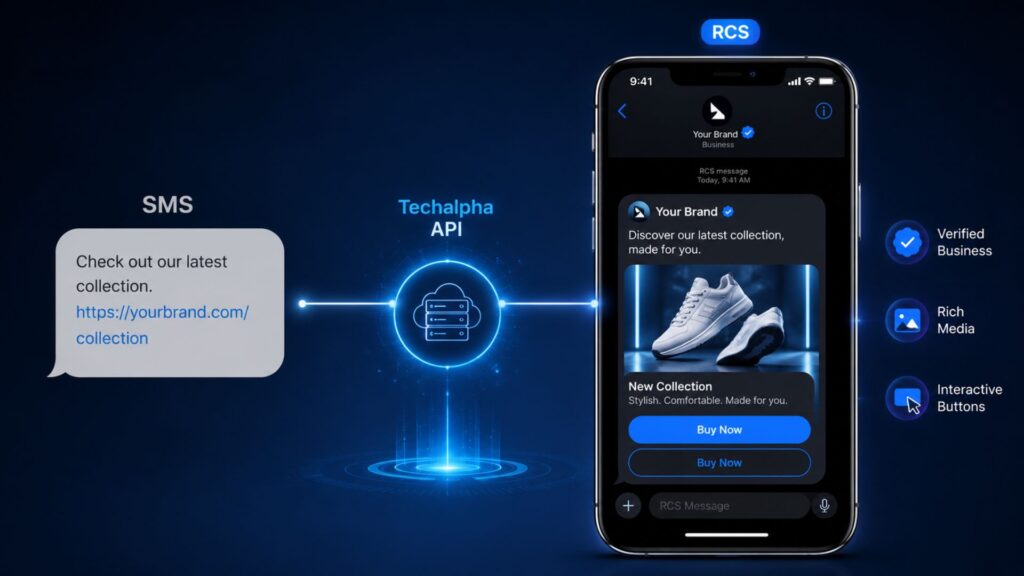
Comparison showing standard SMS text versus an interactive RCS business message displayed natively on an Apple iOS device via Techalpha Group API.
RCS Messaging

RCS Business Messaging iOS Availability: The “Green Bubble” is Now Gold

You spend thousands of dollars designing a beautiful, interactive marketing campaign, only to watch it fracture upon delivery. Android users see a stunning carousel with high-res images and a “Buy Now” button. iPhone users receive a grainy MMS or a plain text link that looks like spam. For the last decade, marketers have been forced to play a game of “lowest common denominator.” Because over 50% of the US market (iPhone users) couldn’t receive Rich Communication Services (RCS), brands had to scale back their campaigns to plain SMS. With the rollout of iOS 18, Apple has officially adopted the Apple RCS Universal Profile. This adoption upgrades the traditional “green bubble” from a text-only, unverified message into a premium, interactive channel. This guide outlines the infrastructure changes behind RCS business messaging iOS availability in 2026, the impact on your customer retention metrics, and how to successfully deploy rich messaging to iOS users today. Executive Summary: The iOS 18 RCS Landscape The RBM Unlock: While P2P RCS launched with iOS 18.0, Apple officially unlocked Application-to-Person (A2P) iOS 18 RBM support starting with iOS 18.1, enabling enterprise brand adoption. Market Growth: Following Apple’s adoption, global RCS Business Messaging traffic surged 5x, with North American traffic scaling rapidly by 14x. Verified Identity: The Verified Sender iPhone update replaces random 5-digit short codes with an official brand name, logo, and a verified checkmark directly inside the native Messages app. Feature Parity: iPhones now support rich carousels, suggested action buttons, high-resolution media sharing, and read receipts natively over cellular data. Intelligent Fallback: Because some older devices or regional carriers lack support, utilizing an orchestration layer like the Techalpha Group API is critical to ensure messages seamlessly downgrade to SMS when necessary. The Technical Foundation: Bridging iOS and Android To understand the scope of this update, it helps to look at the underlying protocols. Historically, the mobile ecosystem relied on fragmented messaging languages: iMessage: Apple’s proprietary, closed-ecosystem protocol. RCS: The GSMA industry standard supported globally by Android. SMS: The legacy protocol utilized to bridge cross-platform communication. The iOS 18 update acts as a universal translator. Apple integrated the GSMA’s RCS industry standard, meaning enterprises can now push a single rich message payload via an API. Whether the payload lands on a Samsung Galaxy S25 or an iPhone 16, it renders natively as an interactive RCS message, eliminating the need to design fragmented cross-platform campaigns. The End-User Experience: Visualizing RCS on iOS Devices Understanding the end-user interface is critical for marketing and product teams. Here is how RCS business messaging iOS availability materializes on the iPhone in 2026. 1. Delivering Verified Brand Trust This is the most critical feature for security and conversion optimization. Legacy SMS: Displays a random short code (e.g., 55-021), offering no visual proof of identity. RCS on iOS: The Verified Sender iPhone display places your exact Brand Name, your Logo, and a Verified Checkmark at the top of the chat. Users immediately recognize authentic communications from trusted brands. 2. Achieving Cross-Platform Feature Parity The interactive experience on iOS is now nearly identical to Android devices: High-Res Media: Supports uncompressed images and high-fidelity video sharing. Engagement Tracking: Natively supports read receipts for accurate open-rate tracking. Interactive UI: “Suggested Actions” and “Rich Cards” execute natively, allowing users to browse products or confirm appointments without leaving the messaging app. Stop Sending Plain Text. Start Sending Experiences. Upgrade your omnichannel strategy with Techalpha Group’s RCS API. Reach 100% of smartphones with intelligent fallback routing. Explore Techalpha RCS Solutions Unifying Omnichannel Campaigns in the RCS Era Before iOS 18.1, RCS required heavy audience segmentation. In 2026, RCS operates as the baseline standard for mobile engagement. The Modern Campaign Workflow: Unified Audience Targeting: Teams no longer need to segment audiences by Operating System. Rich-Media First Design: Design the optimal experience first—utilize carousels, high-res video, and deep links. Automated Fallback: Rely on your CPaaS infrastructure to automatically downgrade the message to SMS for the single-digit percentage of users on unsupported networks. Driving Campaign ROI: When evaluating RCS vs SMS marketing, RCS fundamentally alters the billing structure. RCS pricing is session-based (billed per 24-hour window) rather than segment-based (billed per 160 characters). Data from early enterprise adopters demonstrates that RCS on the iPhone drives 40% to 60% higher engagement rates compared to legacy SMS text links. Implementation Challenges and Security Considerations While the Apple rollout is transformative, enterprises must account for a few infrastructural realities during the transition. 1. Navigating Carrier Rollouts Support for the iPhone’s RCS software depends on the local carrier network. While Tier-1 global carriers support iOS 18 RBM support seamlessly, smaller MVNOs (budget networks) may face delays in their rollout. Enterprises must utilize an API with robust fallback logic rather than assuming immediate 100% network compatibility. 2. Evaluating Encryption Standards Apple launched with RCS Universal Profile 2.4, which features in-transit encryption. Full End-to-End Encryption (E2EE) via Universal Profile 3.0 (utilizing the MLS protocol) is slated for future iOS software updates. 3. User Opt-Outs and Preferences Apple allows users to manually disable “RCS Business Messages” within their device settings. To ensure deliverability to users who opt out, it is imperative to maintain compelling SMS fallback copy within your API payload. Streamlining RCS Delivery with the Techalpha Group API Building complex “If/Else” routing logic for thousands of device and carrier combinations drains engineering resources. The Techalpha Group API handles this orchestration natively. Intelligent Capability Routing: Device Ping: The API silently queries the device capabilities and carrier status prior to transmission. Optimized Routing: If the network confirms “User is on iOS 18.1+ AND Carrier Supports RBM,” the API delivers the rich RCS payload. Seamless Fallback: If the capability check fails, the API automatically strips the rich media and delivers a high-quality SMS format with a tracked short-link. Scaling Your Communications Strategy The integration of the Apple RCS Universal Profile represents a structural shift in enterprise mobile messaging. RCS business messaging iOS availability effectively doubles the addressable market for verified, interactive brand communications. You no longer have to choose between the

Visualizing Frictionless Login: A smartphone automatically reading and filling an OTP code using the WebOTP API.
A2P Messaging

The Zero-Click Login: Implementing Automatic OTP Verification in PHP for the Modern Web

We have all been there. You are signing up for a new service on your phone. You enter your mobile number. You wait. A notification buzzes. You switch apps to Messages. You memorize the code (“8-4-2… wait, was it 2-4-8?”). You switch back to the browser. The page reloads because of memory management. You have to start over. This sequence—the “Context Switch of Death”—kills conversion rates. Every time a user leaves your browser tab to check an SMS, there is a massive risk they won’t come back. They get distracted by a WhatsApp message, or they simply get annoyed with the UI gymnastics. Native apps (Android/iOS) solved this years ago with automatic SMS reading. But for a long time, the mobile web was left in the dust. Enter the WebOTP API. This guide is your complete tutorial for implementing Automatic OTP verification in PHP. We will break down the mechanics, the specific SMS syntax required, the PHP backend logic, and why your choice of SMS provider is critical to making this work reliably. Key Takeaways & Industry Benchmarks The Mobile Conversion Crisis: In 2026, mobile shopping cart abandonment remained staggering, hovering between 75.5% and 80.2%. Friction is the Enemy: Up to 26% of users abandon processes due to overly complicated account creation or login steps. Browser Support: The WebOTP API is fully supported on mobile browsers like Chrome, Opera, and Samsung Internet (Android). The Security Fix: Using an Origin-bound hash prevents phishing; the OS ensures the OTP auto-fills only on your authorized domain. Speed is Non-Negotiable: The API times out. Utilizing a high-speed provider like [Techalpha Group SMS Gateway] is mandatory for the handshake to succeed. The Concept (How the Handshake Works) Before we write a single line of PHP, let’s look at what is happening under the hood. The “magic” isn’t actually magic; it’s a secure handshake between the operating system (Android), the browser, and your website. Here is the workflow for the SMS Retriever API for Web: The Trigger: Your website’s frontend calls navigator.credentials.get(). This tells the browser: “Hey, I’m expecting an SMS for this specific domain. Please listen for it.” The Delivery: Your PHP backend uses a PHP SMS API Integration to send a text. Crucially, this SMS contains a specific hash string at the end. The Handshake: The OS receives the SMS. It sees the hash string (@yourdomain.com #1234) and realizes this message is meant for the browser, not just the user. The Permission: A small prompt appears at the bottom of the screen asking the user for permission to read the code. The Auto-Fill: The user taps “Allow,” and the OTP is pasted into your input field instantly. You are shifting the responsibility of verification from the user to the code, achieving true Mobile User Experience Optimization. The Critical Component – Secure OTP Formatting This is where most implementations fail. You cannot just send “Your code is 1234” and expect it to work. The operating system parses the message body for a strict syntax defined by the standard. To trigger Automatic OTP verification in PHP, your SMS must follow two distinct rules: The Origin-Bound Hash: The very last line of the message must identify your domain, preceded by an @ symbol. The Code: The code itself must follow a # symbol on that exact same line. The Standard Format: Plaintext Your secure verification code is 123456. @www.yourwebsite.com #123456 Here is the catch: If your PHP script sends a standard marketing text without this exact hash configuration, the browser will ignore it completely. The PHP Backend Implementation Now, let’s break down the steps. Your PHP backend needs to generate a secure OTP, format the message string correctly, and dispatch it via a reliable SMS Gateway. Prerequisites: PHP 7.4 or higher Active [Techalpha Group SDK] or API Key Registered DLT Template (for Indian traffic) Step 1: The OTP Generator Don’t use rand(). It is not cryptographically secure. Use random_int() instead. PHP function generateOTP($length = 6) { try { $otp = “”; for ($i = 0; $i < $length; $i++) { $otp .= random_int(0, 9); } return $otp; } catch (Exception $e) { // Fallback error handling return false; } } Step 2: The Dispatcher Function Here is exactly how to construct the Secure OTP formatting and send it via the Techalpha infrastructure. PHP function sendAutomaticOTP($mobileNumber, $otp, $domain) { // 1. Construct the message with the Origin-Bound Hash $message = "Your secure login code is: $otp.nn"; $message .= "@$domain #$otp"; // 2. Prepare the Techalpha API Payload $apiKey = getenv('TECHALPHA_API_KEY'); $senderId = "YOURAPP"; // Your registered DLT Sender ID $payload = [ 'apikey' => $apiKey, ‘sender’ => $senderId, ‘mobile’ => $mobileNumber, ‘message’ => $message, ‘template_id’ => ‘1007264…’ // DLT Template ID for India ]; // 3. Send via cURL $ch = curl_init(); curl_setopt($ch, CURLOPT_URL, “https://api.techalpha.com/send”); curl_setopt($ch, CURLOPT_POST, 1); curl_setopt($ch, CURLOPT_POSTFIELDS, http_build_query($payload)); curl_setopt($ch, CURLOPT_RETURNTRANSFER, true); $response = curl_exec($ch); curl_close($ch); return json_decode($response, true); } Developer Tip: Notice the nn before the hash. It is good practice to visually separate the “machine-readable” part from the “human-readable” part, so the user isn’t confused if they read the notification manually. The Frontend Logic (JavaScript) Your PHP backend has sent the formatted SMS. Now your frontend needs to catch it. To support auto-filling, ensure your HTML input uses autocomplete=”one-time-code”. HTML <form id=”login-form”> <input type=”text” id=”otp-input” autocomplete=”one-time-code” inputmode=”numeric” pattern=”d{6}”> </form> <script> if (‘OTPCredential’ in window) { const ac = new AbortController(); // Start listening BEFORE the SMS arrives navigator.credentials.get({ otp: { transport:[‘sms’] }, signal: ac.signal }).then(otp => { // The browser has received the SMS and extracted the code! document.querySelector(‘#otp-input’).value = otp.code; // Auto-submit the form for Frictionless Login PHP document.querySelector(‘#login-form’).submit(); }).catch(err => { console.log(“WebOTP not supported or timed out:”, err); }); } </script> Crucial Timing: You must call navigator.credentials.get() before the SMS is received by the user. The browser opens a listener window that waits for that specific SMS. Where Most People Fail Implementing Automatic OTP verification in PHP seems straightforward, but real life is messy. Here are the traps that usually break the flow. 1. The Latency

Scroll to Top

DOWNLOAD E-BOOK