
You are sending 10,000 WhatsApp messages a day, but your brand name is still missing from the header. Instead of a trusted green tick, your customers just see an anonymous phone number.
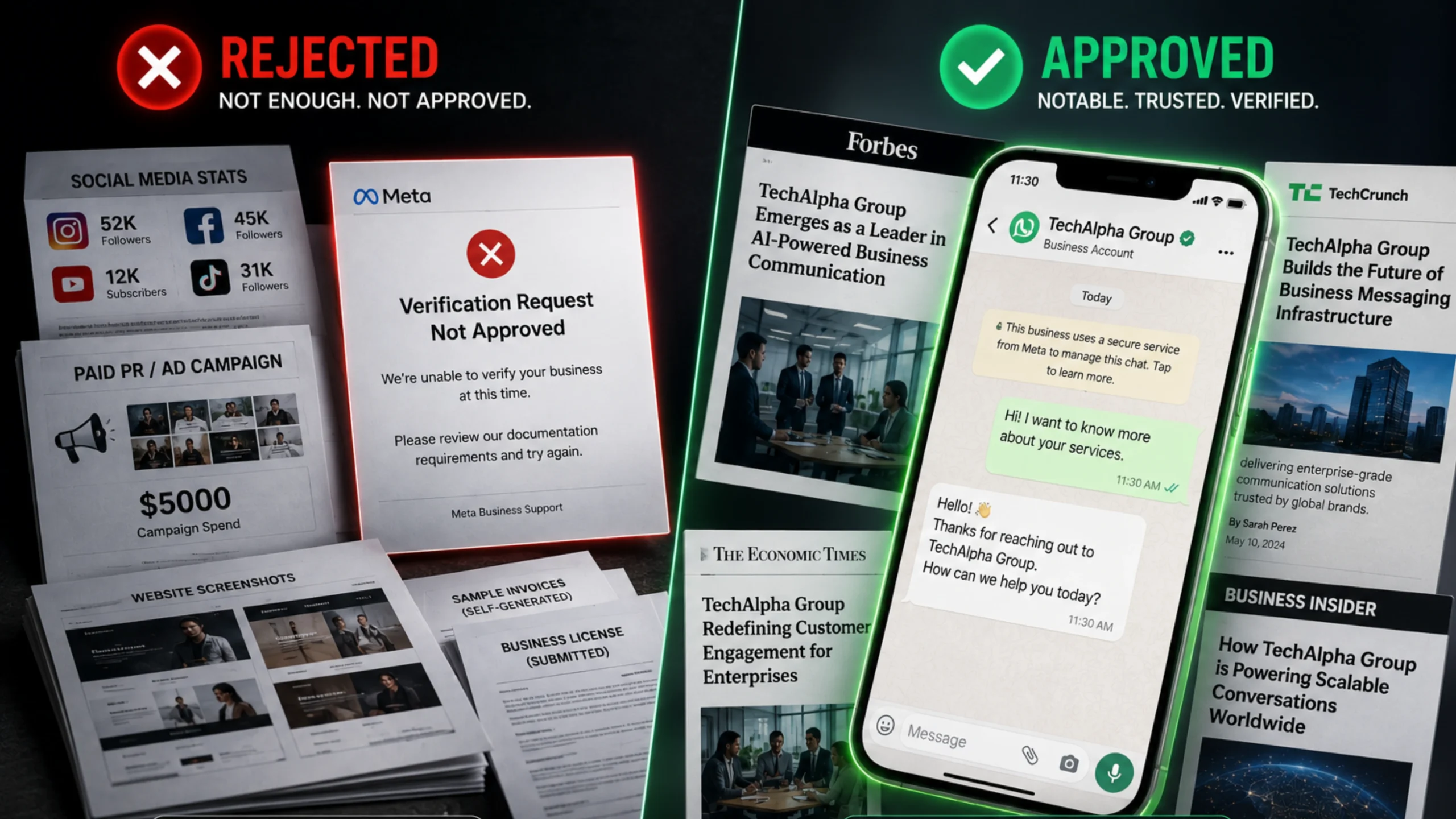
Or worse, you applied for the Green Tick, waited three weeks, and got the dreaded email: “Your request has been rejected. We cannot verify this business at this time.”
No explanation. No feedback. Just a “Try again in 30 days.”
It feels personal. It feels random.
Here is the catch: It is neither. The verification process isn’t a lottery; it is a rigid bureaucratic audit. Most businesses fail not because they aren’t legitimate, but because they submit the wrong proof of legitimacy. They confuse “Business Verification” (proving you exist) with the “Official Business Account” (proving you are famous).
Enter the Green Tick Blueprint.
To get that badge in 2026, you need to stop thinking like a business owner and start thinking like a lawyer building a case. You need to submit the exact WhatsApp Green Tick verification documents that Meta’s auditors are trained to look for.
This guide tears down the secrecy. We will detail the specific paperwork, the strict “Notability” requirements, and the hidden disqualifiers that are auto-rejecting your application.
Key Takeaways
- The 2026 OBA Update: Meta has tightened its rules for the WhatsApp Official Business Account (OBA), prioritizing strict brand notability and limiting how many applications Solution Providers can submit weekly to maintain badge integrity.
- The Two-Step Process: You cannot apply for a Green Tick without first completing standard Meta Business Manager verification to prove your legal existence.
- Notability is Everything: Social media followers do not matter. Meta requires 3 to 5 organic, high-tier press articles to prove your brand is a frequently searched entity.
- The Paid PR Trap: Submitting sponsored content or paid press releases is one of the most common OBA rejection reasons and can flag your account.
Meta Business Verification vs. WhatsApp Official Business Account Status
To understand why you got rejected, you need a new analogy.
Think of standard Meta Business Manager verification like getting a Passport.
- Requirement: Prove you are who you say you are.
- Outcome: You get to travel (use the WhatsApp API).
- Difficulty: Low. Every legitimate citizen (business) gets one.
Think of the Green Tick (OBA) like getting into the VIP Room at an exclusive club.
- Requirement: Prove you are notable.
- Outcome: Elite Status. Instant Trust.
- Difficulty: Extremely High. Having a passport doesn’t get you into the VIP room. You need clout.
Why does this matter? Most brands submit their standard tax documents (their Passport) and expect a Green Tick (VIP Access). That doesn’t work. You need to prove Notability.
The 2026 Checklist: Required WhatsApp Green Tick Verification Documents
You cannot even apply for the Green Tick until you have passed the baseline verification. Here are the exact WhatsApp Green Tick verification documents required for both phases.
Phase 1: The "Existence" Documents (Meta Business Suite)
Before you chase the tick, ensure your Meta Business Manager is verified with these strictly formatted documents:
- Certificate of Incorporation / Business Registration:
- Must Match: The legal name on this document MUST match the name in your WhatsApp Manager exactly.
- Pro Tip: If your legal name is “Techalpha Pvt Ltd” but your WhatsApp display name is “Techalpha,” you need a “DBA” (Doing Business As) or official trademark document linking the two.
- Utility Bill or Bank Statement:
- Purpose: To prove your physical address and phone number.
- The Rule: Must be officially issued and less than 3 months old. Personal bills are instantly rejected.
- Tax Document (GST/VAT/EIN):
- Critical: The document must prominently show the Legal Business Name, not just the owner’s personal name.
Phase 2: The "Notability" Documents (The Green Tick Maker)
This is where 90% of applications fail. Meta requires proof that your brand is “often searched for.”
The Golden Requirement: You must submit 3 to 5 links to major news articles that feature your brand.
- What Counts: TechCrunch, Forbes, The Wall Street Journal, Reuters, or major regional newspapers.
- What Does NOT Count:
- Paid Press Releases (PR Newswire, BusinessWire).
- Your own company blog.
- Social media profiles (Facebook, Instagram, LinkedIn).
- Directory listings (Yelp, Yellow Pages).
The Techalpha Insight: The Press coverage for Green Tick must be about your brand, not just mentioning you in passing. If the headline is “Top 10 Startups” and you are number 9, it carries low weight. If the headline is “How [Your Brand] Changed SMS Marketing,” it carries massive weight.
Technical Prerequisites and Account Health Standards for Meta Approval
Paperwork isn’t enough. Your account health must be spotless before you hit submit.
- Tier 2 Messaging Level: You rarely get verified if you are on the entry-level “Tier 1” limit (1,000 messages/day). Warm up your number and scale to Tier 2 (10,000 messages/day) to show Meta you are a high-volume, serious player.
- Two-Step Verification (2FA): This must be enabled on your WhatsApp Business Manager phone number settings. It is a mandatory security prerequisite.
- Display Name Adherence: Your display name cannot be generic (e.g., “Pizza Shop”). It must be branded (e.g., “Dominos Pizza”). Furthermore, it cannot contain all caps unless it is a recognized acronym (like ‘UPS’).
Common WhatsApp OBA Rejection Reasons and Hidden PR Traps
You submitted everything perfectly. You still got a “No.” Why? Here are the hidden OBA rejection reasons.
1. The "Paid PR" Trap
We have all seen it: Agencies selling “Guaranteed Press Coverage.”
- The Trap: You pay $500 for a sponsored article on Yahoo Finance or MarketWatch.
- The Reality: Meta’s reviewers know these sites sell sponsored content. They maintain a strict blacklist of “Pay-to-Play” domains. Submitting these links is an instant red flag and can hurt future applications.
2. The "Wikipedia" Myth
Having a Wikipedia page helps, but only if it is locked, highly cited, and established. If you created a Wikipedia page yesterday and it has “This article has multiple issues” warnings at the top, it hurts your credibility more than it helps.
3. The "Follower Count" Fallacy
“But we have 500k followers on Instagram!” It doesn’t matter. Meta treats WhatsApp verification completely separately from Instagram/Facebook verification. Social clout does not equal business notability in the eyes of the OBA auditors.
Bypassing the Queue: The Techalpha Managed Verification Strategy
This is where Techalpha Group changes the odds.
Applying through the standard Facebook portal puts you in the general queue. Applying through a Meta-approved Tier-1 BSP puts you in the Partner Queue.
Here is how the Techalpha Group verification service works:
- The Pre-Vetting Audit: Before we submit your application, our team aggressively audits your “Notability Signals.”
- Analysis: “Your 3 press links are weak. Let’s swap the ‘MarketWatch’ link for that organic interview you did with a local newspaper to ensure approval.”
- The Appeal Structuring: If you get rejected, you have to wait 30 days. Techalpha manages the appeal process. We don’t just blindly re-submit; we draft a “Cover Letter” (a feature allowed for Partners) explaining any document discrepancies and attaching the necessary trademark proof to win the case.
- The “Green Tick” Guarantee: Many generic agencies charge a heavy upfront fee just to apply. Techalpha operates as your strategic partner, ensuring your account is completely optimized before we ever initiate the request.
Trust as a Conversion Metric: The ROI of a Verified WhatsApp Brand Identity
The Green Tick is not a vanity metric. It increases message open rates by up to 30% because users instantly trust the sender. It protects your brand from impersonation and drastically reduces the risk of your number being blocked by users.
But you cannot brute-force it. You cannot buy it. You have to earn it with the precise WhatsApp Green Tick verification documents.
Don’t throw a “Hail Mary” application only to get banned from applying for 30 days. Build your case. Gather your evidence. Win the badge.